
Log in to Claude from chat (optional)
If your Gateway runs its Claude models on a Claude CLI login (claude auth login), that login runs out: its refresh token lasts about 30 days. When it does, the agent cannot answer, including the message that would ask it to fix the login. This optional Gateway plugin adds a /claude_login command that renews the login from any chat, Open WebUI included, without the model.
It is an add-on for that setup, not part of the Pipe. With an API key or another credential for your Claude models, you don't need it.
Applies to: Gateway plugin gateway-plugins/claude-login, three Open WebUI prompts
What it does
/claude_login is a plugin command: the Gateway runs it itself, with no LLM turn, so it works while the model is logged out.
| You send | It does |
|---|---|
/claude_login | Starts claude auth login on the Gateway host and replies with the sign-in link |
/claude_login <code> | Passes the code from the sign-in page to that login, then replies with the result |
/claude_login status | Who the CLI is logged in as, and when the login runs out |
/claude_login cancel | Stops a login in progress |
A started login waits 10 minutes for its code. It lives in the Gateway process, so a Gateway restart in between drops it: send /claude_login again. Replies never contain a token, only the account email and the expiry date.
Renew a few days before the date status shows and the agent never goes down.
Who can run it
The command needs the operator.admin scope, so only the Gateway's owner can run it. In Open WebUI that is every user while the Pipe's OWNER_USERS valve is empty, and only the users it lists once it is set. Other users' chats reach the Gateway without that scope, and the Gateway refuses the command. See Owner users.
Install
The plugin runs inside the Gateway, so it goes on the Gateway host, next to the claude CLI the Gateway uses. It also needs script (from util-linux), which gives the CLI the terminal it asks for.
Copy the
gateway-plugins/claude-loginfolder from this repo to a permanent place on the Gateway host.Install it from that folder:
bashopenclaw plugins install --link --accept-capabilities /path/to/claude-loginThis adds the folder to
plugins.load.paths, enables the plugin and writes its install record. The record matters: a folder that is only listed inplugins.load.pathsshows as enabled inopenclaw plugins list, but the Gateway skips it at startup.Restart the Gateway.
Check that it loaded: openclaw plugins inspect claude-login says Status: enabled and Trust: reason=origin-path, and the Gateway's startup log lists claude-login among its plugins. Then send /claude_login status in a chat.
The plugin uses the Claude CLI's own config directory: CLAUDE_CONFIG_DIR when the Gateway has it set, ~/.claude otherwise.
Add the commands to Open WebUI's / menu
Open WebUI lists its Workspace Prompts in the composer's / menu, so three prompts make the command one pick away. They are in gateway-plugins/claude-login/open-webui-prompts.json.
In Open WebUI, go to Workspace > Prompts, choose Import JSON among the page's actions and pick that file (an admin, or a user allowed to import prompts). You get:
/claude_login: inserts/claude_loginto get the sign-in link./claude_login_code: asks for the code in a small form, then inserts/claude_login <code>./claude_login_status: inserts/claude_login status.
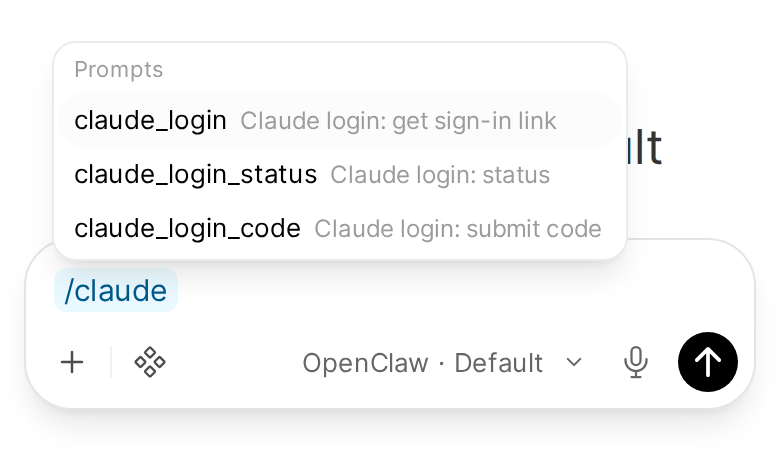
With slash commands in the / menu on, /claude_login is in the menu without this import. Imported, your /claude_login prompt is kept and the synced one skipped; the other two are only in this file.
Imported prompts belong to the user who imports them. Share them in each prompt's access settings if another owner should see them too.
Renew the login
- Send
/claude_login(or pick the first prompt). The reply has a sign-in link. - Open it, sign in with the Claude account the Gateway should use, and approve. The page shows a code.
- Send
/claude_login <code>(or pick the second prompt and paste the code). The reply saysLogin complete.and the new expiry date.
If the reply says the login did not complete, the code was wrong or too old: start again with /claude_login.