
Troubleshooting
Something not working? Find your symptom or the error in the chat below, then check the Open WebUI backend log for [openclaw-pipe] lines. If you still need help, the last section says what to put in a bug report.
Applies to: Pipe, Action, Filter Valves: GATEWAY_URL, GATEWAY_TOKEN, AGENT_ID, STATE_DIR, DEVICE_IDENTITY, MAX_MODELS, USE_OWUI_FILES, OWUI_BASE_URL, OWUI_API_KEY, TITLE_GEN_AGENT_ID
Start with the healthcheck
The installer can check the install for you, fix the common problems and run an end-to-end smoke test.
In the repo checkout:
uv run install.py status        # what is installed: is the function active, global and listed
uv run install.py repair        # re-run the install steps on the existing function, then the smoke tests
uv run install.py healthcheck   # status plus the smoke tests, without reinstalling
More on these commands: The installer.
Symptoms
| Symptom | Likely cause and fix |
|---|---|
| "The GATEWAY_TOKEN valve is empty" | The valve is not set. In Open WebUI, go to Admin Panel > Functions > OpenClaw Gateway > valves and set GATEWAY_TOKEN to the value of gateway.auth.token in your OpenClaw config. |
| A "Gateway connection error:" line instead of a reply | Open WebUI cannot reach GATEWAY_URL. The Open WebUI backend makes this connection, not your browser, so check the network from the Open WebUI host or container. If Open WebUI runs in Docker and the Gateway on the host, localhost is the container: see Open WebUI in a container. |
| A model is missing from the model picker | Run uv run install.py repair: it makes sure the function is active, global and listed in /api/v1/models. Also check that MAX_MODELS (default 30) is not capping the list. |
| "pairing required", or "not an approved device" | Run uv run install.py repair, or approve the request on the Gateway host with openclaw devices approve <request-id>. See Device pairing. |
| Repeated device-pairing prompts | STATE_DIR is not persistent. Grep the backend log for STATE_DIR unavailable: the Pipe then uses /tmp/openclaw-bridge, which a container restart wipes. Point STATE_DIR at a persistent volume. |
The agent stops answering after about a month, and the Gateway log has OAuth session expired or Not logged in | Its Claude models run on a Claude CLI login, which lasts about 30 days. Log in again with claude auth login on the Gateway host, or from any chat with the optional /claude_login plugin. |
| Device identity not persisting | Check STATE_DIR and the DEVICE_IDENTITY valve, then run uv run install.py healthcheck. |
ModuleNotFoundError: websockets when the function loads | Open WebUI's frontmatter auto-install is off (ENABLE_PIP_INSTALL_FRONTMATTER_REQUIREMENTS=false) or it runs in OFFLINE_MODE. Install websockets and cryptography into the Open WebUI image yourself. |
| Models are listed as "-- example, Gateway not reached" | The Pipe has not reached your Gateway yet, so the picker shows a built-in example list instead of your models. Pick OpenClaw · Default (it always works), send one message to connect, then reload: the real list replaces it. If it persists, the Gateway is unreachable: check GATEWAY_URL and GATEWAY_TOKEN. |
"Could not start a session on agent <id>" | AGENT_ID names an agent your Gateway does not define. Use main unless you configured others. |
| Tool calls not showing | The calls that draw tool cards fail silently. Check the backend log, and that Open WebUI is at least the minimum in Versions. |
| An image link points at port 18791 instead of being attached | The upload to Open WebUI's Files API failed and the Pipe fell back to its own file server. The log says OWUI file upload failed; falling back. Check OWUI_BASE_URL, the request's login or OWUI_API_KEY, and the Open WebUI log. See also Security. |
| A reply goes quiet for a long time | The Pipe has no silence timeout: a quiet reply is usually a long tool call or the model thinking. The reply ends when the run ends, fails or is stopped. If the page stopped updating, reload: the partial answer is kept. Check the backend log for the turn. See Reliability. |
| The answer stops after a Gateway restart | The Pipe resumes a reply cut off by a Gateway restart, up to 3 times per reply. After that the reply ends with a "cut off" note: the Gateway was down too long or kept restarting. Send the message again. |
A typed /compact, /status, /fork or /model does nothing in OpenClaw | Open WebUI 0.12 handles these commands itself, so they never reach OpenClaw. To compact the session, use the Compact button in the Status dialog. |
| Chats never get a title | TITLE_GEN_AGENT_ID (default title-gen) must name an agent your Gateway defines. If it does not, titles are skipped without an error. |
Errors in the chat
Failures name the thing that fixes them. When the cause is genuinely ambiguous, the message says so instead of guessing.
| The chat shows | What to do |
|---|---|
| "This Open WebUI instance is not an approved device on the OpenClaw Gateway yet", with this device's id | On the Gateway host, run openclaw devices list, then openclaw devices approve <request-id> for the request with that id. Then send your message again. |
| "The Gateway rejected the credentials" | GATEWAY_TOKEN must match gateway.auth.token in your OpenClaw config. |
| "The GATEWAY_URL valve is empty", or "GATEWAY_URL has an unsupported scheme" | Set GATEWAY_URL to a bare host:port, for example localhost:18789. A pasted http:// or ws:// prefix is accepted and means no TLS; https:// or wss:// means TLS (port 443 unless you give one, see Two hosts); any other prefix is not accepted. |
"No response from the OpenClaw Gateway at <host:port> within 10s", or "Could not connect to the OpenClaw Gateway at <host:port>" | Check GATEWAY_URL, that the Gateway is running, and that the Open WebUI backend can reach that host. |
| "Could not connect to the OpenClaw Gateway" with an SSL or certificate error, after an update | A GATEWAY_URL starting with https:// or wss:// now connects over TLS. If your Gateway is not behind a TLS proxy, remove the prefix (gateway.example:18789). If it is, the proxy's certificate must be issued for the host name in GATEWAY_URL and trusted by the Open WebUI container, see Two hosts. |
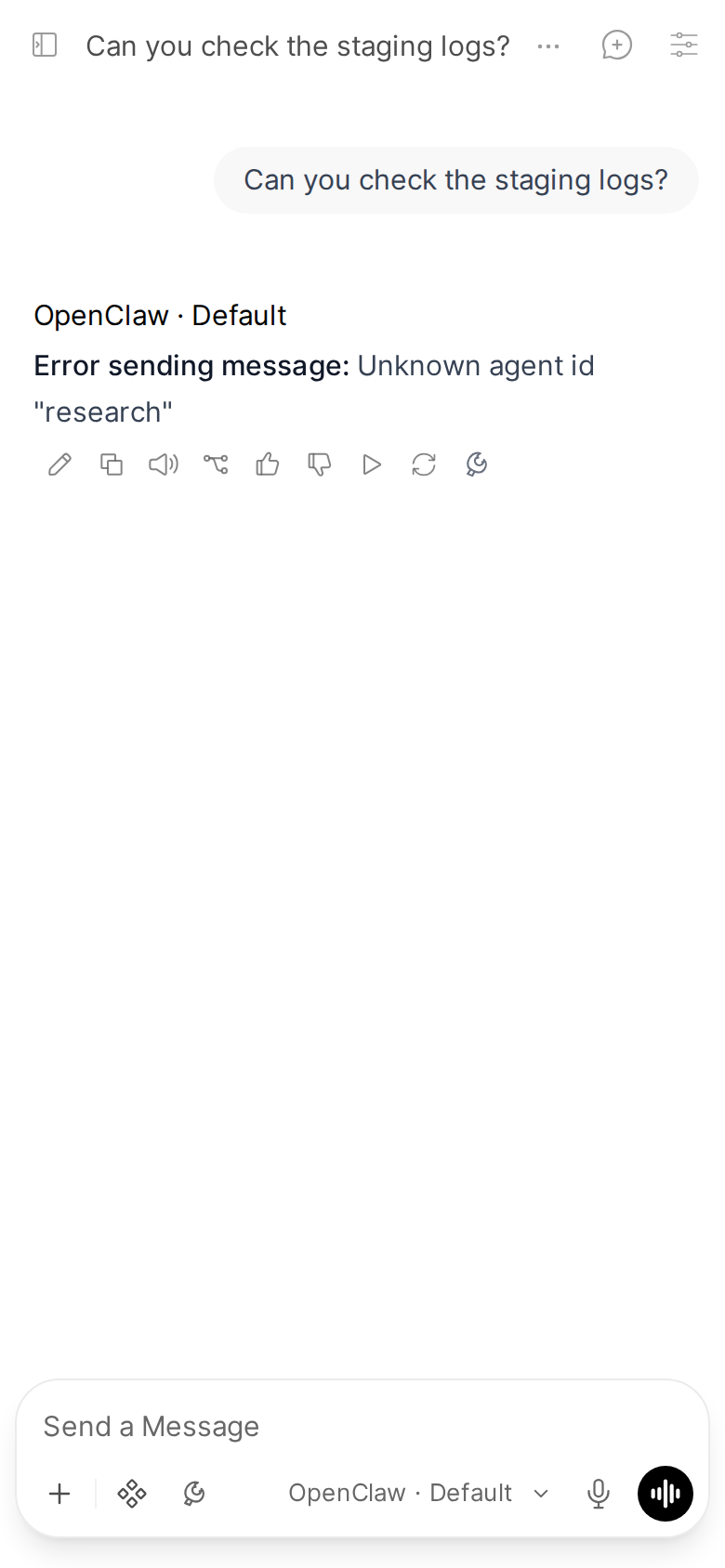
Error sending message: Agent "<id>" no longer exists in configuration (the screenshot above) | AGENT_ID names an agent your Gateway does not define. Use main unless you configured others. |
"Could not start a session on agent <id>" | Fix AGENT_ID. The model may be fine: applying the model is just the first thing the Pipe asks the agent to do. |
"Model selection error: could not apply <model>" | The Gateway refused that model. Pick another one, or check DEFAULT_MODEL. |
| "Could not start this conversation's session" | The cause is unclear. Check that AGENT_ID names an agent your Gateway defines and that the model is one it offers. |
| "The Gateway did not respond in time while starting this conversation" | Usually transient: send the message again. If it keeps happening, check that the Gateway is healthy and reachable from Open WebUI. |
| "Timeout: Gateway did not respond to chat.send", or "Error sending message" | The Gateway did not accept the message. Send it again; if it repeats, check the Gateway's own log. |
| "Error:" followed by a message | The run failed on the Gateway, and the text after "Error:" is the Gateway's own error. |
| "Failed: the run did not complete." | The run failed and the Gateway gave no reason. Check the Gateway's log. |
| "This reply was cut off: the run was interrupted again after 3 attempts to continue it." | See "The answer stops after a Gateway restart" above. |
Where the logs are
Every turn logs to the Open WebUI backend log (its standard output), each line prefixed with [openclaw-pipe]. The Status Action logs with the same prefix. The thinking filter does not log.
One reply in the Pipe's log (an excerpt):
[openclaw-pipe] Messages: 1, last role: user
[openclaw-pipe] Session key: agent:main:openwebui-<user id>-<chat id>
[openclaw-pipe] Cleared model override; using agent default
[openclaw-pipe] Captured runId: msg-<chat id>-<message id>-1792018617.1007752
[openclaw-pipe]   Tool start: exec
[openclaw-pipe]   Item: kind=tool status=running title=exec Commits from the last week
[openclaw-pipe]   Tool result: exec (200 chars)
[openclaw-pipe]   Item: kind=tool status=completed title=exec Commits from the last week
[openclaw-pipe]   Tool start: read
[openclaw-pipe]   Item: kind=tool status=running title=read from forecast/CHANGELOG.md
[openclaw-pipe]   Tool result: read (273 chars)
[openclaw-pipe]   Item: kind=tool status=completed title=read from forecast/CHANGELOG.md
[openclaw-pipe]   lifecycle end -> done
[openclaw-pipe] DONE -- 129 events processed, text yielded: True
On the Open WebUI host, with Docker (the container name depends on your deployment):
docker logs --since 30m open-webui 2>&1 | grep '\[openclaw-pipe\]'What you will find there, always on and not configurable:
- for every turn: the session key, the run id, the event count, and tool starts and results;
- a turn that produced no text at all, marked
[diag] PHANTOM (no text); STATE_DIR unavailable, when the Pipe fell back to/tmp/openclaw-bridge;OWUI file upload failed; falling back, when an attachment went to the file server instead;resumed as ..., with a count out of 3, when a reply continued after a Gateway restart.
What to put in a bug report
Open an issue at github.com/Eliav2/openclaw-openwebui-integration/issues with:
- Versions: Open WebUI, OpenClaw, and the function's version (Admin Panel > Functions, or the
version:line at the top ofopenclaw_pipe.py). Check them against Versions first. - Setup: one host or two (two hosts), and which functions you installed (Pipe, Status Action, thinking filter).
- What happened: what you did, what you expected, what you saw. A screenshot helps.
- The healthcheck output:
uv run install.py healthcheck. - The log lines: the
[openclaw-pipe]lines for the failing turn, and the Gateway's log around the same time.
Before you paste anything, remove secrets: never include GATEWAY_TOKEN, DEVICE_IDENTITY, OWUI_API_KEY, .pipe_device_identity.json or anything from backups/. See Security.
For a security problem, do not open a public issue: report it privately as SECURITY.md describes.